
Submitting Artwork
Hello! On this page you will find practically everything you may need for submitting your artwork files.
Virtually any artwork file you send us we will be able to utilize! The table below lists preferred formats.
For your convenience here are some options for submitting your artwork file(s):
- Submitting Artwork and Quote Form
- Email us at sales@infinimark.com
- Fax us at 818-576-1166
-
Via mail:
Infinity Stamps, Inc.
8577 Canoga Ave
Canoga Park, CA 91304, U.S.A - If you just have something in mind, tell us what it is. You may also find a visit to our Clip-Art Gallery and Font Gallery helpful.
-
For any questions and immediate assistance give us a call at 818-576-1188 between 8am-5pm PST, Monday-Friday (excluding U.S. holidays).
Things to Keep in Mind
Please ensure that all fonts are converted to outlines or embedded before saving and sending your file.
An essential factor for creating a metal stamp with highly defined contours is the use of artwork with clearly defined details. If we find that your submitted artwork can be "fine tuned" to improve the clarity of the imprints, we will make recommendations.
Other Pages you May find Helpful:
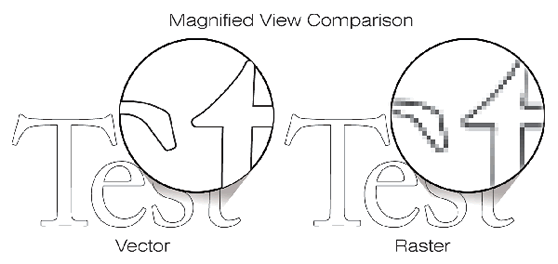
For a quick visual comparison and overview of preferred Raster and Vector formats, see the figures below:
Fig. 1
| Preferred Raster (Picture) Formats | Preferred Vector (Mathematical) Formats |
|---|---|
| .jpg | .eps |
| .psd | |
| .png | .ai |
| .tif | .dxf |
| .gif | .svg |
| .bmp | |
| .wmf | |
Fig. 2
About Our Proofs:
After we enter your order, our Graphics Design team will prepare an actual size proof that you will receive via e-mail from your representative for your review.
Note: To review your proof in actual size, scale your page to 100% and print out. If modifications are needed, or to approve the proof, please respond to your representative via e-mail.